
Release Notes
Curious about what we’ve been working on?
Our release notes are organised by quarter, so you can easily see what’s changed. If you have feedback, ideas, or questions, please get in touch.

AI well-being coach: from beta to public launch
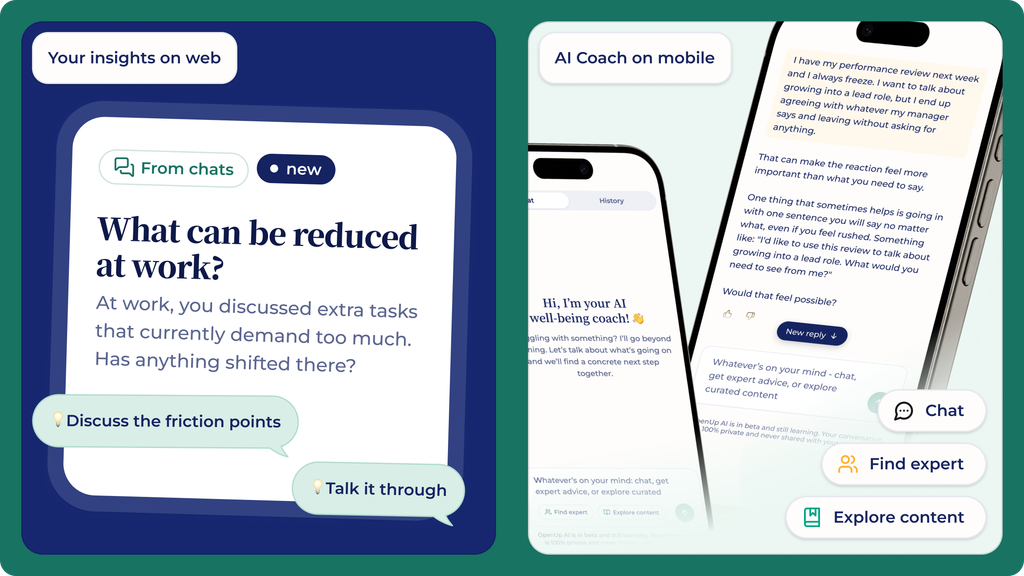
Your well-being coach is available for everyone in the MyOpenUp platform and already got smarter during the beta phase, and from October it will be in the mobile app too!
Available now
Practical guidance. Employees talk through what’s on their mind at any moment, get practical advice grounded in OpenUp’s content on mental well-being, physical health, leadership and performance, and get help booking a 1:1 session with one of our 200+ certified experts, including medical doctors, straight from the conversation.
It remembers. The coach picks up where the last conversation left off. No repeating your story every time.
From mid-October
In the mobile app. The coach arrives in the MyOpenUp app, so employees can use it during their commute, between shifts, or in the evening. Especially important for non-desk employees.
Personalised nudges. Insight cards turn an employee’s own Vitality Check results and the well-being coach conversation into a concrete next step, shown right on their AI well-being coach landing page and homepage.
For HR and people teams. A low-barrier way in for the people who would never book a session on their own and from October, one that reaches front-line and mobile-only employees too. More employees reached, no extra work on your side.
Privacy note: Usage is private and confidential. Employers never receive individual conversation content or any identifiable information about employee use of the AI coach.
Try our smarter AI well-being coach →
Vitality Check in the Mobile App
Check in with yourself, wherever you are
Your Vitality Check is now part of the OpenUp app. Designed for mobile experience, so you can check in from anywhere instead of needing to be at your desk.
You’ll get a clear picture of your well-being, across themes like sleep, stress, energy and connection, along with personalised content recommendations for your results.
Take it again a month later and you’ll see your growth in real time.
Download the app: iOS & Android

Audio in MyOpenUp, both in web & mobile app
Take a moment for yourself, whenever it suits you
Guided meditations and audio exercises are now available in MyOpenUp, in our platform and mobile app. Employees can listen on their commute, during a walk, or between meetings.
On the new Audio page in Explore, they can choose Foundations to build a steady practice, or Quick Resets to calm down or refocus in a few minutes.
For HR and people teams: A few minutes of audio fits easily into a busy work day, which makes it simple for your people to look after their well-being every week, not only when they’re struggling.
HR Dashboard
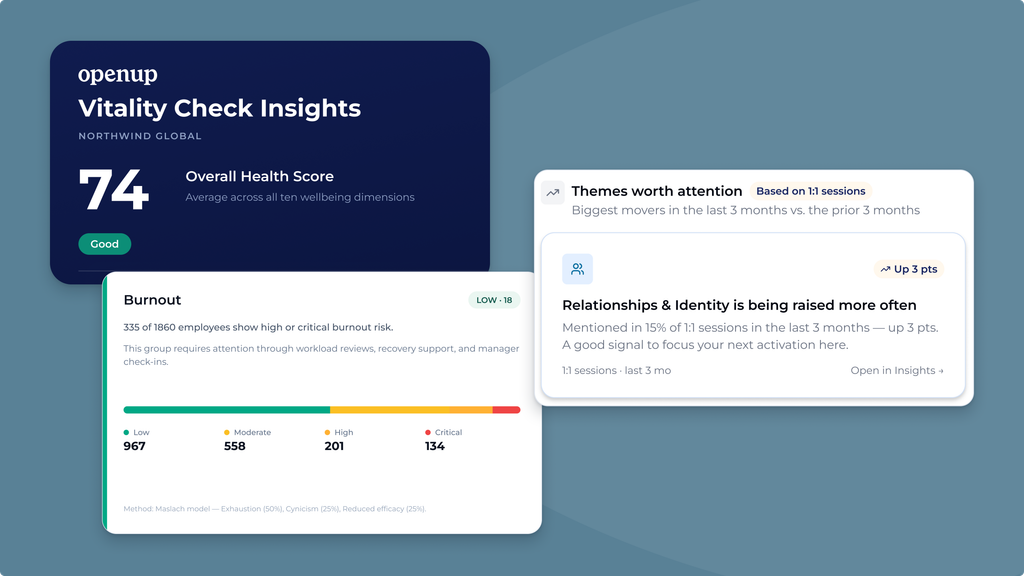
Now featuring your organisation’s Vitality Check report
The new Vitality Check company report shows how your organisation is actually doing across each theme, not just how much OpenUp is used.
It lives in a rebuilt HR Dashboard that tracks engagement, activities, session ratings and themes from 1:1 sessions over time, so you can see what’s changing and where to focus.
Privacy is top of mind: All data is anonymised and aggregated, and we hide results when too few people respond.
AI well-being coach
New in MyOpenUp · available to everyone from July 2026
Some things are easier to figure out once you’ve said them out loud. The AI well-being coach is a self-reflection partner, now available to everyone in MyOpenUp. It’s built for when you might not feel ready to talk to a person yet, you’ve signed up but don’t know where to start, or something comes up between sessions that you’d rather not sit with until next time.
Rather than handing you generic advice, it asks the questions that help you find the words for what’s actually going on. The clearer that picture gets, the easier it is to take the next step that’s right for you: a session with one of our experts, a masterclass, an article, or simply a moment of clarity. Whatever it is, the coach helps you get there faster.
We built it carefully with our Lead Psychologists and Medical Doctors, grounded in CBT principles and reviewed by certified experts. It’s EU-hosted and GDPR-compliant. Your conversations are always anonymous and never visible to your employer. And when you need a human, the coach routes you to one of our 200+ certified experts.
Start your first conversation in MyOpenUp →

What’s new and improved
Improved Vitality Check
Now shorter, more actionable, and work-stress compliant
We’ve updated our Vitality Check to be more accessible and impactful. It now takes less than ten minutes to complete, includes a psychosocial work stress component so your teams can use it as part of your preventive health policy (PSA), and comes with an improved AI-generated summary to help your employees better understand and act on their results. As always, we use AI responsibly.
Learn more about our vision on AI at OpenUp here. →

New features and improvements
Mobile App
The right support, made effortless
That’s why we’ve redesigned the OpenUp mobile app with a streamlined home screen, AI-powered search to quickly find the right content, and a simplified booking flow. So you can go from opening the app to finding the content you need with fewer taps.

Vitality Check
Understand your well-being in 10 minutes
Get a clear picture of what to focus on and personalised recommendations to help you take action. As HR, you’ll receive anonymised insights to understand and support your workforce’s well-being.

AI Search
Find the right content faster and easier than ever
Our new AI-powered search helps you quickly discover the most relevant content based on what you need in the moment. Instead of browsing or guessing where to start, you can search in plain language and get smarter, more relevant results, so you spend less time searching and more time getting support.

Updated Booking Flow
A clearer, guided path to book a session
We have improved the booking flow to make each step in the process clearer and easier to follow. The updated flow provides better structure, clearer navigation, and improved visuals to guide users smoothly from choosing a session to connecting with an expert.
Want to switch expert? We’ll guide you through a few short steps in the the booking flow to find you someone else.

What’s new and improved
Financial Coaching 1:1 (Add-on)
Get practical financial related support
Employees can now book 1:1 sessions with a financial expert to get guidance on budgeting, debt, savings, and financial planning. These sessions help guiding you financially, supporting both short-term peace of mind and long-term financial well-being.

Confidential Advisor 1:1 (Add-on)
Get professional work-related guidance
Employees can now book 1:1 advisor sessions to discuss work-related questions or situations with a trusted professional. These sessions are designed for moments when someone needs guidance, perspective, or advice on workplace topics, helping employees reflect, make informed decisions, and move forward with confidence.

24/7 Helpline
24/7 support for life’s tough moments
From everyday stress to those moments when it all feels too much; tough moments don’t stick to office hours. That’s why our 24/7 helpline is available throughout the week, including evenings, weekends and nights. Employees can speak to real experts in English, Dutch or German, whenever they need support. More languages coming soon.
